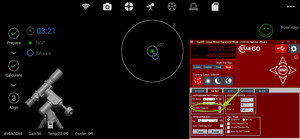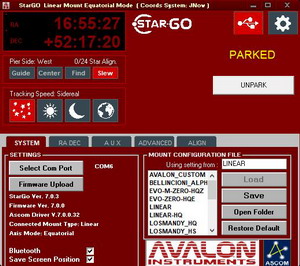






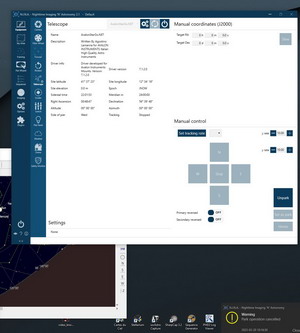
If the camera is connected to the StarGo Plus, the corresponding camera driver should be first selected in the StarGo Plus WebApp (see image below). If the device has been connected after the StarGo Plus start up try a system power cycle.
This behavior may be related to latest Operative System update that can create issues with previous StarGo versions.
The issue can be solved by upgrading to the latest StarGo versions available on the Support Page reserved download area.
Users with EVO-zero mount should download and install the Install_StarGo_700_B5.exe whereas all the other users should download and install the Install_StarGo_640_SP6.exe.
The "Park operation cancelled" Warning message triggered by N.I.N.A. when parking the mount from inside this software has been fixed with the release of a BETA version of the Avalon ASCOM driver that is available with the temporary link below:
https://drive.google.com/file/d/1ZiKylYMS29ch6jjiRGY7NTRjYPfVzDxX/view?usp=sharing
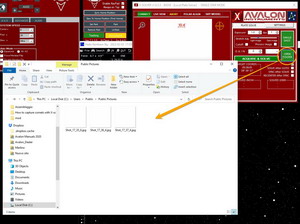
By using in conjunction the Avalon X-solver tool and the HNSKY software is possible to set up an automation that allows to capture asteroids or comets by having the target in the frame center and the background sliding behind.
NOTE: the following procedure can be performed by using X-solver 1.6.5.5 version, included starting from the StarGo_640_SP6.
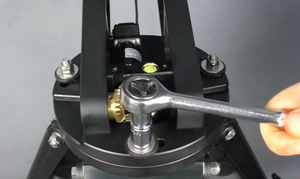
In order to allow the mount free rotation on the Azimuth, being at the same time firmly assembled on the base flange, the three bolts must be tightned with the correct pressure.
This adjustment it is performed at the company before to ship the mount.
Issue:
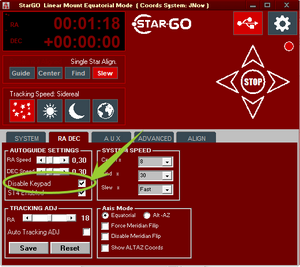
The mount doesn’t complete the 60° rotation required for the ASIAIR Polar Alignment procedure.
Solution:
Inside the StarGo.exe software, RA DEC tab, check the “Disable Keypad” option.
Otherwise plug the keypad on the StarGo board.
Ekos comes provided with a powerful and useful tool that allows to perform an accurate Polar Alignment even in location where the Polaris is not visible.
The procedure is quite straightforward, the mount will perform three different rotations on the RA axis, shooting a picture for each one.
Thanks to the Plate Solving, the software receive the precise position of each rotation and, calculating the overall movement, is able to estimate how much the RA axis is drifting away from the real North, guiding the user to perform the required corrections.
Park Procedure
1. Run the StarGo.exe
2. Perform the Sync Home Position
3. Perform a GoTo or Move the mount on the choosen position for the Park
4. Click on the “Set Park” button to choose the position for the Park.
5. Start the session and point the mount on other objects
6. At the end of the session click on the “Park” button. The mount will slew to the position choosen through the “Set Park” function, retaining it in the next session, even after a shutdown.
NOTE: this mean that in the next session another Sync Home Position is not required.
7. Close the StarGo.exe and Power off the mount.
The Park position is a key point and a very useful feature for fixed location setup and observatories. The StarGo system include this very important feature, allowing to put the telescope in a choosen position at the end of the session, retaining in memory the alignment with the sky even after a power off.
But what’s happen in case, for any reason, the position is lost? Normally a new Sync Home Position is required.
But thanks to the “Restore Park” feature, included in the StarGo, it will be possible to restore the Park position and the sky alignment in a fast and quick way, simply following the preliminary operation steps explained below, without requiring another Sync Home Position procedure.
This preliminary procedure must be done only once, in order to use the “Restore Park” feature in the proper way.
Avalon mounts with StarGo GoTo Control System can be connected to the ASIair app by following the step by step procedure described below:
Normally the pointing error offset that is used after a Sync or a Plate Solve, is not stored in the memory, because, the mount will be moved from at the end of the session.
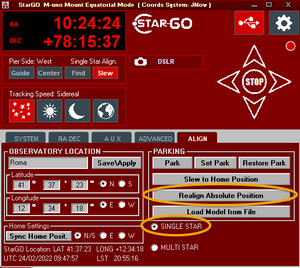
In case of use in a Observatory or a stable location, it is possible to store in memory the pointing error offset, by using the “Realign Absolute Position” feature by following the step by step procedure explained below:
The slew stop before the target it is a protection function designed for a safety reason, in order to prevent the mount uncontrolled movement due to the network latency, when the mount is used from a remote connection. But it can also happen in case of no keypad connected.